How to fix Supermaven in Jetbrains editors with version 2025+
At the end of 2024 the company behind Supermaven - one of the best offline AI code completion plugin for the Jetbrains platform was acquired by Cursor. Since that time the awesome plugin they made was left without support for the latest versions of Jetbrains editors.
The fix is straightforward. Download the latest version of the extension, place it in the same folder as the script below, and run the script:
#!/usr/bin/env bash

# This script is used to update the supermaven extension manifest to run on IntelliJ 2025

# Configuration variables
SUPERMAVEN_VERSION="1.43"
TARGET_INTELLIJ_VERSION="251.*"

# Get current script directory
DIR="$( cd "$( dirname "${BASH_SOURCE[0]}" )" >/dev/null 2>&1 && pwd )"

# Check if the supermaven zip file exists
SUPERMAVEN_FILE="supermaven-${SUPERMAVEN_VERSION}.zip"
if [ ! -f "$DIR/$SUPERMAVEN_FILE" ]; then
    echo "The '$SUPERMAVEN_FILE' file does not exist in the current directory."
    echo "Please download the '$SUPERMAVEN_FILE' file from the IntelliJ IDEA extensions page and place it in the current directory."
    echo "Extension path: https://plugins.jetbrains.com/plugin/23893-supermaven/versions/stable"
    exit 1
fi

echo "Updating the supermaven extension manifest to run on IntelliJ with version $TARGET_INTELLIJ_VERSION..."

# Create a temporary directory
TMP_DIR=$(mktemp -d)

# Extract the supermaven zip file to the temporary directory
unzip -q "$DIR/$SUPERMAVEN_FILE" -d "$TMP_DIR"

# Unzip the instrumented jar file from the temporary directory
INSTRUMENTED_JAR="instrumented-supermaven-${SUPERMAVEN_VERSION}.jar"
unzip -q "$TMP_DIR/supermaven/lib/$INSTRUMENTED_JAR" -d "$TMP_DIR/supermaven/lib/instrumented-supermaven-${SUPERMAVEN_VERSION}"

# Edit the until-build attribute in the plugin.xml file
if [[ "$OSTYPE" == "darwin"* ]]; then
    # macOS
    sed -i '' "s/until-build=\"243.*\"/until-build=\"${TARGET_INTELLIJ_VERSION}\"/g" "$TMP_DIR/supermaven/lib/instrumented-supermaven-${SUPERMAVEN_VERSION}/META-INF/plugin.xml"
else
    # Linux
    sed -i "s/until-build=\"243.*\"/until-build=\"${TARGET_INTELLIJ_VERSION}\"/g" "$TMP_DIR/supermaven/lib/instrumented-supermaven-${SUPERMAVEN_VERSION}/META-INF/plugin.xml"
fi

# Update the jar file with the new plugin.xml file
(cd "$TMP_DIR/supermaven/lib/instrumented-supermaven-${SUPERMAVEN_VERSION}" && zip -qr "$TMP_DIR/supermaven/lib/$INSTRUMENTED_JAR" .)

# Remove the extracted directory from the temporary directory
rm -rf "$TMP_DIR/supermaven/lib/instrumented-supermaven-${SUPERMAVEN_VERSION}"

# Create a new zip file from the temporary directory
(cd "$TMP_DIR" && zip -qr "$TMP_DIR/supermaven.zip" .)

# Replace the original file with the updated version
mv "$TMP_DIR/supermaven.zip" "$DIR/supermaven-${SUPERMAVEN_VERSION}-updated.zip"

# Cleanup the temporary directory
rm -rf "$TMP_DIR"

echo "Done! Updated file saved as: supermaven-${SUPERMAVEN_VERSION}-updated.zip"
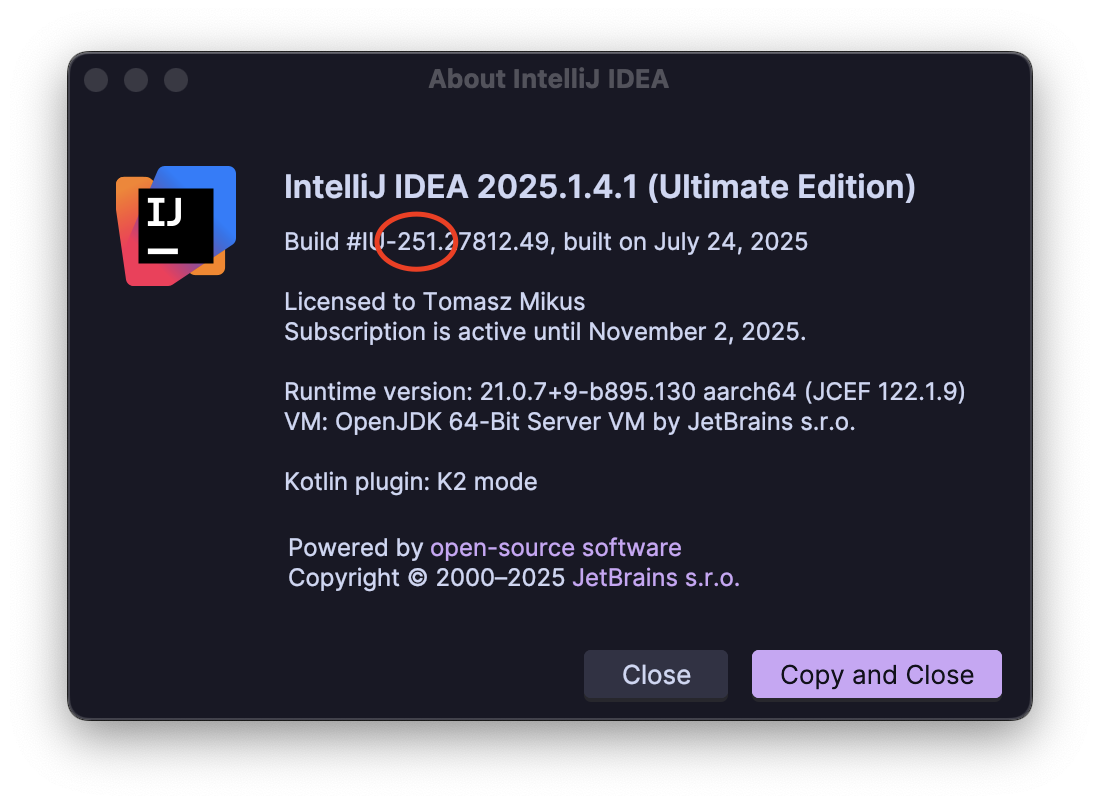
In the future, when Jetbrains will release new versions of their editors you’ll have to update the TARGET_INTELLIJ_VERSION="251.*" to a version that matches your editor. You can find the Jetbrains editor major version by opening the Jetbrains editor of your choice (in my case IntelliJ), then in the menu bar click on “IntellJ IDEA”, then “About IntelliJ IDEA”.
You should see a popup similar to the following. Pick the first three digits of the highlighted number and update your script with them, save, and run the script. The extension should work fine with your editor.